Where cursive text works
Cursive Unicode text is accepted almost everywhere text is — with one consistent exception, and a few places where it renders but behaves oddly. This page lists them so you can paste with confidence.
The short version
- Bios, captions, comments and messages: yes on every platform in the table below.
- Display names: yes on most, but not all — Facebook requires a real name and LinkedIn removes styled letters from it. The table says which.
- Usernames and handles: no, on every platform in the table below. They are restricted to plain ASCII by design.
- Screen readers: read the characters, not the word. Use cursive for a flourish, not for information.
- Old or unusual devices (smart TVs, car displays, some e-readers): may show boxes. Phones and computers from the last decade render it — test which styles your own device draws.
Platform by platform
| Platform | Bio / status | Display name | Username | Notes |
|---|---|---|---|---|
| Yes | Yes | No | Comments and captions accept it. Combining marks (underline, strike) sometimes render unevenly in the bio's small size. | |
| Discord | Yes (status, About Me) | Yes | No | Channel and role names accept it too. Some third-party clients strip combining marks. |
| X (Twitter) | Yes | Yes | No | Shows in the timeline. A styled letter inside a hashtag ends the hashtag. |
| TikTok | Yes | Yes (nickname) | No | Ornaments such as ♡ and ✦ render slightly smaller than letters. Comments accept it, with the tightest character budget of the three fields. |
| WhatsApp / iMessage / SMS | Yes (status) | Yes (profile name) | — | Messages accept it; SMS to a non-smartphone may show boxes. |
| Yes | No — names must be real | No | Posts and comments accept it; the profile name field rejects it. | |
| Yes | Discouraged | No | Renders in posts and the About section; styled letters in the name field are removed by moderation. | |
| Email subject / body | — | Sender name: usually | — | Most clients render it. Spam filters treat heavy Unicode styling in subjects as a signal. |
This table is from testing rather than from published documentation, because most platforms do not publish these rules. If a field behaves differently for you, the rule has changed, the moderation applied, or the row is wrong — all three happen.
Two platforms have enough field-by-field detail to need their own page. On Instagram the 150-character bio is the constraint, and how far it goes depends on whether the field counts characters or UTF-16 units. On Discord it is the 32-character display name, and messages are better served by markdown than by these characters at all. Both pages measure your own text instead of quoting a limit at you. For a document rather than a profile, see what to use in Microsoft Word, where a real typeface beats anything you can paste.
Style by style
The four platforms the generator previews, plus screen readers. Good means it renders as intended; Limited means ornaments may shrink or a combining mark may be dropped.
| Style | Discord | X (Twitter) | TikTok | Screen readers | |
|---|---|---|---|---|---|
| Cursive script | Good | Good | Good | Good | Poor |
| Bold cursive | Good | Good | Good | Good | Poor |
| Italic cursive | Good | Good | Good | Good | Poor |
| Bold italic cursive | Good | Good | Good | Good | Poor |
| Fancy cursive | Good | Good | Good | Limited | Poor |
| Aesthetic cursive | Good | Good | Good | Limited | Poor |
| Cursive with hearts | Good | Good | Good | Limited | Poor |
| Underlined cursive | Limited | Good | Good | Limited | Poor |
| Vintage cursive | Good | Good | Good | Limited | Poor |
| Spaced cursive | Good | Good | Good | Good | Poor |
| Struck cursive | Limited | Good | Good | Limited | Poor |
| Handwritten slant | Good | Good | Good | Good | Poor |
Why usernames say no
A username is an address. It goes into a URL, gets typed on a phone keyboard, gets searched, and has to be unambiguous — two names that look the same must be the same. Cursive characters break all four: they are not on any keyboard, they are not the same string as the plain letters they resemble, and 𝒶 and 𝓪and a are three different characters that look nearly identical. So the platforms in the table restrict handles to a small ASCII set. Display names have none of those jobs, which is why they take cursive and most other Unicode — subject to each platform’s own filtering of invisible characters and to its moderation rules.
Why the same text looks different on two devices
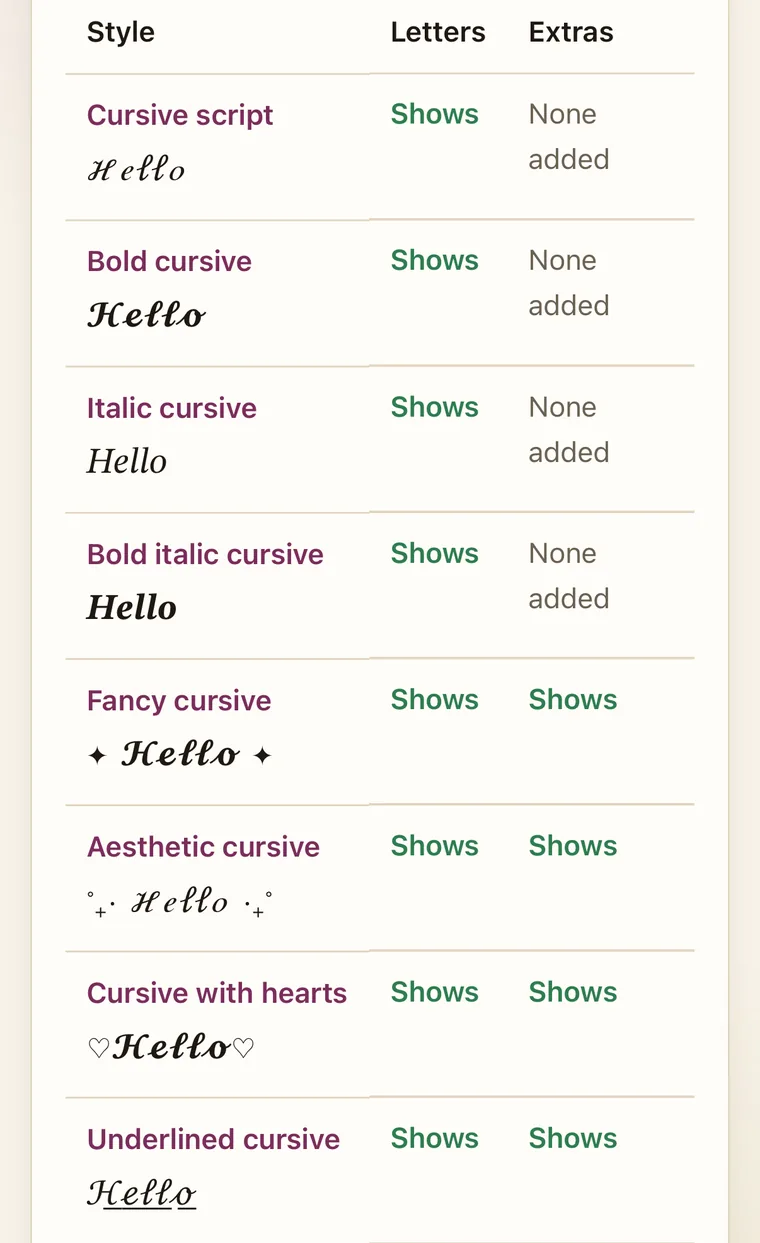
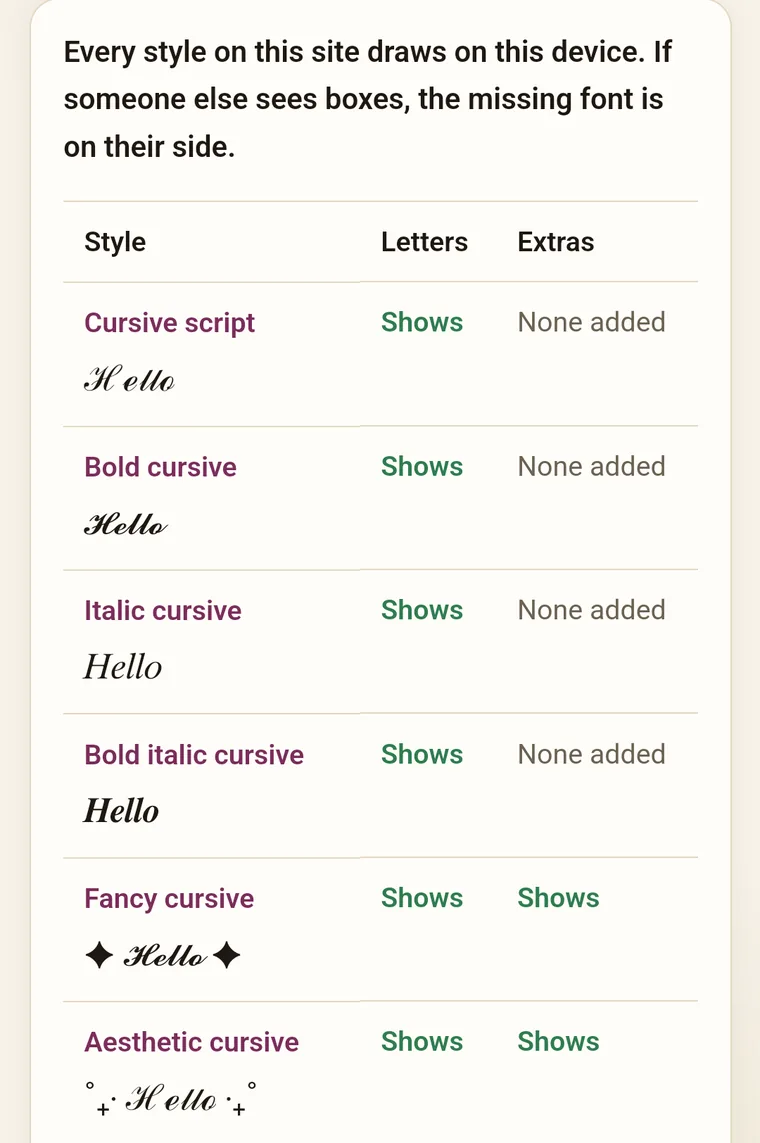
Unicode defines which character is which; it does not define how a character is drawn. Each operating system ships a symbol font that covers the Mathematical Alphanumeric block — Apple Symbols on iPhone and Mac, Segoe UI Symbol on Windows, Noto Sans Math on Android — and each draws the script letters a little differently, exactly as two typefaces draw a plain A differently. The characters you pasted are identical on both devices; the rendering is not, and there is no way to control it from inside a bio.
What screen readers do
Screen readers speak characters by their Unicode identity. A plain a is spoken as “a”; 𝒶is “mathematical script small a” to a reader that knows the name, and silence or a pause to one that does not. Some readers normalise the character and speak the plain letter, which is better but still letter by letter. For a person listening, a name in cursive is a small annoyance; a paragraph in cursive is unreadable. The compatibility chips on every card mark screen readers Poor for that reason, and it does not vary by style.
Combining marks are the fragile part
Underlined and struck cursive attach a combining mark to every letter. Combining marks are ordinary Unicode, and current phone and computer fonts render them, but they are the one thing some input fields normalise away and some fonts position badly. If a decorated style is going somewhere important, paste a short test first. Ornaments that sit beside the text — stars, hearts, fleurons — are separate characters and far more robust.
Frequently asked questions
Why can't I put cursive text in my username?
Usernames are identifiers, not display text. The platforms in the table below limit them to ASCII letters, digits and one or two punctuation marks so that they can be typed, searched and put in a URL. Cursive characters are outside that set and are rejected or stripped on save. Display names, which are just labels, have no such restriction.
Why does one letter in a word look different from the others?
The light script alphabet borrows eleven letters (ℬ ℰ ℱ ℋ ℐ ℒ ℳ ℛ ℯ ℊ ℴ) from an older Unicode block, and fonts draw them from a separate table. Bold script has no borrowed letters, which is why it looks more even.
What does a screen reader say when it reaches cursive text?
It depends on the reader. VoiceOver and NVDA typically announce the Unicode name of each character — 'mathematical bold script small c', and so on — or read the plain letter with a long pause between each, or skip characters the voice has no name for. A whole sentence is very hard to follow; a short name is tolerable. Keep anything important in plain text.
Why do I see empty boxes or question marks instead of cursive letters?
The device has no font covering the Mathematical Alphanumeric block. This is rare on phones and computers from the last decade, but happens on some smart TVs, car displays, e-readers and very old Android versions. The text itself is fine; it will render on a device that has the font. The box test page checks each of the twelve styles on the device you are using.
Does cursive text affect how Google or a platform's search finds my profile?
It can. Cursive letters are different characters from the plain ones they resemble, so a search that compares characters will not match a cursive display name to the plain spelling, and platforms rarely document how much their search folds look-alikes together. A hashtag written in cursive is not the same string as the plain hashtag. Keep the searchable version plain and use cursive as the decorative layer.